Victor Johnson
Imagine opening a chat application on Monday morning and asking an AI assistant to help plan a holiday. You discuss destinations, compare hotels, calculate costs and eventually settle on a week in Italy. Throughout the conversation, the assistant remembers that you prefer quiet accommodation, dislike early flights and want to stay within a particular budget. Everything seems intelligent. The assistant remembers what you said five minutes ago, refers to earlier decisions and adjusts its recommendations accordingly. Then you close the conversation.
A week later, you open a completely new chat and ask the same assistant to plan another trip. This time, it suggests an early morning flight, an expensive hotel and a destination you previously rejected. What happened to its memory? The answer introduces one of the most important distinctions in modern AI system design: remembering information within a conversation is not the same as having a persistent memory system. This distinction becomes even more important when building autonomous AI agents that work across multiple tasks, sessions, tools and environments.
An agent that merely remembers the current conversation can appear intelligent for a few minutes. An agent with a well-designed memory architecture can learn from previous interactions, retrieve relevant experiences, maintain useful knowledge and adapt its behaviour over time. But there is a catch. Not all memories serve the same purpose, and not every type of memory should be stored or retrieved in the same way. To understand why, imagine building an AI agent from the ground up.
The Assistant That Could Remember Only Today
Our story begins with a fictional AI assistant called Atlas. Atlas has access to a language model, a collection of tools and a chat interface. It can answer questions, search documents, call APIs and perform basic tasks. On its first day, a user asks:
“Can you help me investigate why yesterday’s data synchronisation failed?”
Atlas examines application logs, checks an API response and identifies an expired authentication credential. The user then asks:
“Can you summarise what we discovered?”
Atlas responds correctly. It remembers the expired credential, the failed API request and the troubleshooting steps. At first glance, Atlas appears to have memory. However, the information is simply present in the conversation context supplied to the language model.
Chat Session Memory Is Not the Same as Agent Memory
A typical chat application maintains a sequence of messages:
System message
    |
User message
    |
Assistant response
    |
User message
    |
Tool response
    |
Assistant response
When another message arrives, the application may send some or all of the previous conversation back to the model. The model can then refer to earlier messages because they are included in its current input. This is commonly called conversation memory, chat history or session memory.
It is useful, but it has important limitations. First, the model does not necessarily retain the conversation after the application stops providing it. Second, the available context window is finite. Long conversations may require truncation, summarisation or selective retrieval. Third, chat history contains everything together: questions, answers, errors, corrections, temporary assumptions and potentially sensitive information. Fourth, a conversation transcript does not automatically distinguish between an important long-term fact and a temporary statement that should be forgotten.
Consider these two messages:
“For this particular test, use the development database.”
“Production data must never be written to the development database.”
Both appear in the conversation, but they have very different meanings and lifetimes. An agent should not treat them as interchangeable memories.
Session Memory Versus Persistent Agent Memory
| Characteristic | Chat session memory | Persistent agent memory |
|---|---|---|
| Primary purpose | Maintain conversation continuity | Preserve useful information across tasks or sessions |
| Typical content | Messages, tool outputs, recent decisions | Facts, experiences, preferences, procedures and outcomes |
| Lifetime | Usually limited to a session or retained history | Defined by application policy |
| Retrieval | Recent messages or context selection | Explicit lookup, search or retrieval |
| Updating | Append, trim or summarise messages | Insert, merge, revise, invalidate or delete memories |
| Main concern | Context length and relevance | Accuracy, provenance, privacy, relevance and lifecycle |
| Typical storage | In-memory state, cache or conversation database | Relational database, document store, vector index or other storage |
There is an important nuance: a chat application can persist conversation history in a database, and an agent can use recent chat messages as working memory. Therefore, the distinction is not simply whether data survives a restart. The more meaningful distinction is how information is represented, selected, maintained and reused.
Chat history preserves a record of conversation. An agent memory system deliberately manages information that may be useful for future reasoning or action.
Why Simply Saving Every Conversation Is Not Enough
Suppose Atlas stores every conversation permanently. After six months, it has accumulated thousands of messages. It knows that a database connection failed in January, that a user changed a project name in February, and that an API endpoint returned an error in March. But which information should it retrieve when investigating a new failure in October?
Saving everything solves the problem of persistence, but not the problem of relevance. A useful memory system needs answers to several questions:
- What information deserves to be remembered?
- How should it be represented?
- When should it be retrieved?
- How should conflicting information be handled?
- When should a memory expire or be deleted?
- How can the agent avoid treating an old observation as a current fact?
These questions lead us beyond chat history and into memory architecture.
The Moment Atlas Needed More Than a Conversation
Several weeks later, Atlas receives another synchronisation failure. The symptoms look familiar. The API returns an authentication error, and the background job stops processing records. Atlas begins troubleshooting from the beginning. It checks the endpoint, inspects the response and searches for configuration problems. Eventually, it discovers that the authentication credential has expired. Again.
The user asks:
“Didn’t we solve this exact problem last month?”
Atlas has no useful answer because the previous troubleshooting experience is no longer in its current context. This is the moment we decide to give Atlas a more deliberate memory system. But before choosing a database or a retrieval framework, we need to answer a more fundamental question. What kind of memory does Atlas actually need?
The answer is not one memory type. It is several, each serving a different purpose.
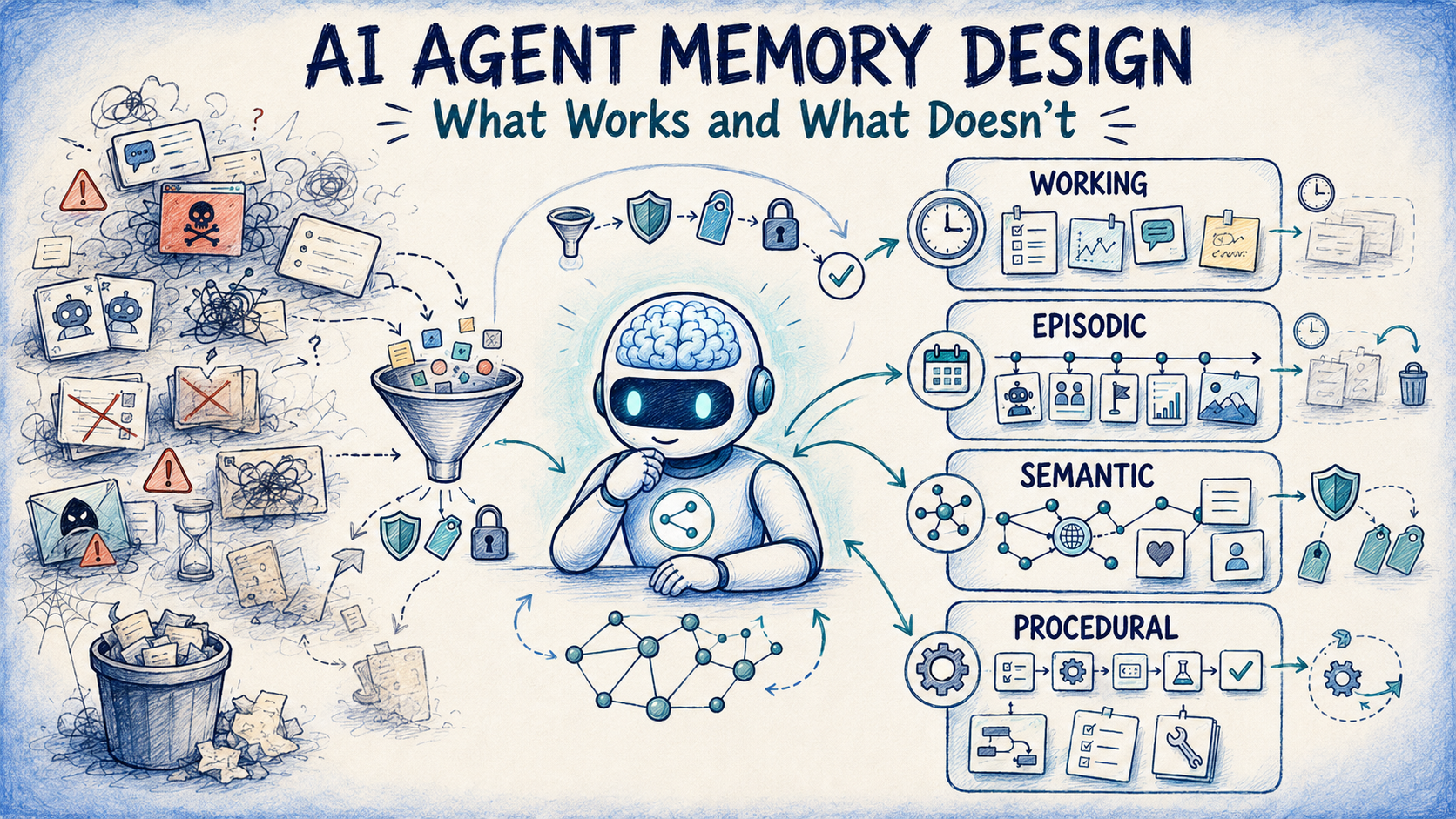
Working Memory — What the Agent Needs Right Now
Imagine Atlas investigating a failed synchronisation job. It has collected the following information:
- The current job identifier.
- The API endpoint being called.
- The latest error response.
- The last successful execution timestamp.
- The retry count.
- The user’s current instructions.
- A temporary hypothesis about the failure.
All of this information matters during the current task. However, most of it does not need to become permanent knowledge. This is the role of working memory.
Working memory contains the information an agent actively needs to reason, make decisions and complete its current task. It is closely related to the idea of working memory in cognitive psychology, although AI implementations are engineering abstractions rather than direct replicas of human cognition.
What Working Memory Looks Like
{
  "task_id": "sync-investigation-1042",
  "objective": "Investigate failed Graph API sync",
  "current_step": "Inspect authentication response",
  "last_error": "401 Unauthorized",
  "retry_count": 2,
  "hypothesis": "Access token may have expired",
  "status": "investigating"
}
This state could be maintained in application memory, a cache, a database record or an orchestration framework. The key characteristic is its purpose: it supports the task currently in progress.
When to Use Working Memory
Working memory is appropriate when an agent needs to:
- Track progress through a multi-step workflow.
- Maintain intermediate calculations.
- Remember tool responses during execution.
- Track retries, errors and pending actions.
- Coordinate several tool calls.
- Resume an interrupted task from a checkpoint.
For example, an agent processing 10,000 records might need to remember which page of results it has reached. That is working state. It should not be confused with a long-term memory about how similar jobs were solved in the past.
When Not to Use Working Memory
Working memory is not the best place for:
- Long-term user preferences.
- Historical troubleshooting experiences.
- Organisation-wide policies.
- Durable operational procedures.
- Information that must survive beyond the current workflow without a separate persistence mechanism.
An important exception is durable execution. A long-running agent may persist its working state so that it can resume after a restart. That does not automatically make the state semantic or episodic memory. It remains working memory because of how it is used.
The Design Lesson
Working memory answers:
“What does the agent need to know to complete the task it is doing right now?”
It does not answer: “What has the agent learned over its lifetime?” For that, Atlas needs another type of memory.
Episodic Memory — Remembering What Happened Before
A month later, Atlas encounters another authentication failure. This time, we want it to remember the previous incident. Not merely the final answer, but the experience. What was the original problem? What actions were taken? Which attempts failed? What eventually worked?
This is episodic memory. Episodic memory represents past events, interactions or task executions. It is particularly useful when the sequence of events and the outcome matter.
An Example Episodic Memory
{
  "episode_id": "incident-2026-001",
  "timestamp": "2026-10-12T09:30:00Z",
  "task_type": "graph_api_troubleshooting",
  "context": {
    "service": "data_sync",
    "error_code": 401
  },
  "actions": [
    "Checked API permissions",
    "Validated token expiry",
    "Renewed authentication credentials",
    "Retried synchronisation"
  ],
  "outcome": "success",
  "lesson": "Expired credentials caused the authentication failure"
}
Notice that this memory describes an event. It does not necessarily establish a universal rule. An expired credential caused one incident. That does not mean every future 401 Unauthorized response has the same cause. A well-designed agent should use the episode as evidence for a hypothesis, not as proof.
How Atlas Uses Episodic Memory
During the new investigation, Atlas searches for previous episodes involving:
- Microsoft Graph.
- Synchronisation failures.
- Authentication errors.
- Similar error codes.
- Successful remediation steps.
It retrieves the previous incident and reasons:
“A similar incident was previously caused by expired credentials. I should check token validity before investigating less likely causes.”
This is a major improvement. Atlas is no longer beginning every investigation from zero. It can use past experiences to prioritise its next action.
When to Use Episodic Memory
Episodic memory is particularly valuable for:
- Troubleshooting agents that learn from previous incidents.
- Customer support agents that remember previous cases.
- Research agents that track earlier investigations.
- Coding agents that remember attempted fixes and test outcomes.
- Operational agents that record successful and unsuccessful workflows.
- Personal assistants that need continuity across meaningful events.
When Not to Use Episodic Memory
Avoid relying on episodic memory when:
- The information is a stable fact that should be represented directly.
- Exact current data is required from an authoritative system.
- Past outcomes are no longer applicable.
- The experience contains sensitive data that should not be retained.
- A previous action was successful only because of circumstances that have since changed.
For example, an episode stating that a particular API endpoint worked last year is not sufficient evidence that it still works today. The agent should verify current behaviour when necessary.
A Critical Distinction: Episodic Memory Is Not a Vector Database
This is where AI architecture discussions frequently become confused. Someone might say:
“We implemented episodic memory using a vector database.”
Another engineer might say:
“Our episodic memories are stored in PostgreSQL.”
Both implementations can be valid. Episodic memory describes the kind of information being remembered. A vector database or relational database describes how that information is stored and retrieved. These are different architectural decisions. We will return to this distinction in detail.
Semantic Memory — Remembering What Is Known
After solving several incidents, Atlas begins recognising patterns. It learns that Microsoft Graph access tokens have limited lifetimes. It knows that certain endpoints support pagination. It understands that a synchronisation checkpoint should generally advance only after successful processing. These are not memories of individual events. They are facts, concepts and relationships.
This is semantic memory. Semantic memory represents knowledge that can be reused independently of the original experience in which it was acquired.
From Experience to Knowledge
Consider three incidents:
Episode 1: A synchronisation job failed because its access token expired.
Episode 2: Another job failed after an authentication token became invalid.
Episode 3: A background process recovered successfully after obtaining a new token.
Atlas may derive a general operational lesson:
“Authentication failures can be caused by expired or invalid access tokens, so token validity is an appropriate diagnostic check.”
That statement is semantic knowledge. The original episodes remain useful because they provide evidence and context. However, the semantic memory captures a reusable concept.
An Example Semantic Memory
{
  "memory_id": "knowledge-graph-auth-001",
  "type": "semantic",
  "subject": "Microsoft Graph authentication",
  "fact": "Expired or invalid access tokens can cause authentication failures",
  "source": "validated operational documentation",
  "confidence": 0.98,
  "last_verified": "2026-10-20T00:00:00Z"
}
The confidence value here is an application-defined assessment, not an objective probability of truth. A production system should record provenance and verification status rather than relying only on a numerical confidence score.
When to Use Semantic Memory
Semantic memory is useful for:
- Domain knowledge.
- Product and service facts.
- Organisational terminology.
- Technical concepts.
- User preferences that are expected to remain relevant.
- Relationships between entities.
- Reusable lessons extracted from previous experiences.
For example, Atlas may remember:
“This organisation uses Azure SQL for synchronisation checkpoints.”
That is a useful fact about its operating environment.
When Not to Use Semantic Memory
Semantic memory is less suitable for:
- Temporary execution state.
- Detailed chronological incident histories.
- Information requiring exact real-time verification.
- Unconfirmed assumptions.
- Facts that have no clear ownership, source or update policy.
One dangerous mistake is turning a temporary observation into permanent knowledge. Suppose a user says:
“The production endpoint is unavailable today.”
Atlas should not permanently remember:
“The production endpoint is unavailable.”
The original statement has a time boundary. A good memory system preserves that context.
Semantic Memory and Retrieval-Augmented Generation
Semantic memory is often associated with retrieval-augmented generation, or RAG. However, RAG is a retrieval-and-generation pattern, not a memory type. A RAG system can retrieve semantic knowledge, episodic records, procedures or ordinary documents.
Similarly, semantic memory does not require vector search. It might be stored as structured facts in SQL, relationships in a graph database, documents in a search index or embeddings in a vector store. The correct choice depends on the questions the agent must answer.
Procedural Memory — Remembering How to Do Something
Atlas now knows what happened in previous incidents. It also knows general facts about authentication and synchronisation. But suppose the user asks:
“Can you perform the standard recovery process for a failed synchronisation?”
Atlas needs more than facts. It needs a repeatable sequence of actions. This introduces procedural memory.
Procedural memory represents knowledge about how to perform tasks. In an AI agent, this may take the form of instructions, workflows, skills, executable routines, decision rules or tool-use procedures.
An Example Procedure
procedure: recover_failed_sync
steps:
  - verify_current_job_status
  - inspect_last_error
  - check_authentication
  - validate_checkpoint
  - retry_failed_window
  - verify_persisted_records
  - update_checkpoint_after_success
safety_rules:
  - never_advance_checkpoint_before_success
  - prevent_overlapping_executions
  - require_approval_for_destructive_operations
This is different from an episode. An episode describes what happened during a particular execution. A procedure describes what should be done when performing a class of tasks.
When to Use Procedural Memory
Procedural memory is valuable for:
- Repeated operational workflows.
- Standard troubleshooting processes.
- Multi-step tool execution.
- Coding conventions and development procedures.
- Business approval processes.
- Data validation and recovery routines.
- Agents that must behave consistently across sessions.
When Not to Use Procedural Memory
Procedural memory is not appropriate when:
- The task is highly exploratory and cannot be reduced to a stable process.
- The procedure is obsolete.
- The workflow depends on permissions the agent does not possess.
- An agent would be allowed to modify its own critical safety procedures without review.
- The procedure contains secrets that should instead be managed through secure configuration.
There is another important distinction here. A procedure stored as natural-language instructions is not the same as a procedure enforced by application code. A language model may interpret an instruction incorrectly or omit a step.
For critical operations, procedural memory should guide the agent, while deterministic application logic enforces required controls. For example, the rule “never advance the checkpoint before persistence succeeds” should ideally be enforced by the application workflow rather than left entirely to the model.
Other Memory Categories Worth Understanding
Working, episodic, semantic and procedural memory are among the most useful categories for designing agents. However, real systems often introduce additional classifications. These are not always mutually exclusive types. Some describe how long information is retained, while others describe what information represents.
Short-Term Memory
Short-term memory generally refers to information retained for a limited period. It might include recent conversation messages, temporary observations or intermediate task details. It overlaps significantly with working memory, although working memory specifically emphasises information actively used during reasoning.
Use it when recent context matters. Do not use it as the only mechanism for long-term continuity.
Long-Term Memory
Long-term memory is an umbrella term for information intended to remain available across sessions or extended periods. It can include episodic, semantic and procedural memories. Therefore, long-term memory is not necessarily a separate content category. It describes persistence and reuse over time.
Use it when information must remain available beyond the current task. Do not retain everything indefinitely simply because storage is inexpensive.
Prospective Memory
Prospective memory concerns remembering to perform an action in the future. Imagine the user tells Atlas:
“Check the synchronisation status tomorrow morning.”
Atlas needs to retain an intention associated with a future condition or time. A possible representation is:
{
  "type": "prospective",
  "action": "check_sync_status",
  "scheduled_for": "2026-10-28T09:00:00Z",
  "status": "pending"
}
In production, this should usually be implemented through a reliable scheduler, queue or workflow engine. A memory record alone does not guarantee that an action will execute.
Use prospective memory for reminders, scheduled follow-ups and condition-based actions. Do not use it as a replacement for dependable job scheduling.
Reflective Memory
Some agent systems maintain higher-level reflections or lessons derived from multiple experiences. For example:
“Authentication checks frequently resolve synchronisation failures, but previous incidents show that permission changes can produce similar symptoms.”
This is sometimes called reflective memory. It is often best understood as derived semantic knowledge supported by episodic evidence, rather than an entirely separate fundamental memory type.
Use reflections when an agent benefits from identifying patterns across experiences. Avoid treating automatically generated reflections as verified truths.
Entity or Relationship Memory
An agent may also need to remember relationships. For example:
Sync Service
    |
    +-- uses --> Microsoft Graph
    |
    +-- stores checkpoints in --> Azure SQL
    |
    +-- authenticates through --> Entra ID
This is often described as entity memory or graph-based memory. It can help an agent reason about systems, dependencies and organisational structures. However, the relationships themselves are semantic knowledge. A graph database is simply one possible implementation.
The Most Important Architectural Distinction — Memory Design Is Not Memory Implementation
We now reach the decision that often causes the greatest confusion in AI agent architecture. Imagine two engineers building episodic memory for Atlas. Both agree on the requirement:
“The agent must remember previous incidents and retrieve relevant experiences when investigating similar problems.”
They have chosen the same memory design. They have not yet chosen the same implementation. The first engineer proposes a vector database. The second proposes a relational database. A third proposes combining both. Who is correct? Potentially all three.
Memory Design Answers “What and Why?”
At the design level, the team decides:
- What information qualifies as an episode?
- What metadata should accompany it?
- How long should it be retained?
- What events should trigger retrieval?
- How should the agent use retrieved episodes?
- How should conflicting or outdated experiences be handled?
- What security boundaries apply?
These decisions define the memory’s purpose and behaviour.
Implementation Answers “How?”
At the implementation level, the team decides:
- Which database to use.
- Whether to generate embeddings.
- Whether to use exact filtering or semantic similarity.
- How to partition data by tenant or user.
- How to index timestamps and metadata.
- How to rank retrieved results.
- How to enforce retention and deletion.
- How to measure retrieval quality.
These are storage, indexing and retrieval decisions. They should follow from the requirements rather than define the memory category.
Example A: Episodic Memory in a Relational Database
Suppose every incident has structured metadata.
CREATE TABLE agent_episodes (
    episode_id VARCHAR(100) PRIMARY KEY,
    tenant_id VARCHAR(100) NOT NULL,
    occurred_at TIMESTAMP NOT NULL,
    service_name VARCHAR(100),
    error_code VARCHAR(50),
    summary TEXT,
    actions_json TEXT,
    outcome VARCHAR(50)
);
When Atlas encounters a 401 error, the application can retrieve relevant incidents:
SELECT *
FROM agent_episodes
WHERE tenant_id = :tenant_id
  AND service_name = 'graph_sync'
  AND error_code = '401'
ORDER BY occurred_at DESC
LIMIT 10;
This is episodic memory implemented with relational storage. It works well when episodes have predictable fields and the agent frequently searches using known identifiers. There is no requirement for embeddings.
Example B: Episodic Memory in a Vector Store
Now imagine users describe incidents in natural language. One user says:
“The background job stopped because its credentials were no longer valid.”
Another says:
“The synchronisation process failed after the access token expired.”
The wording differs, but the situations are related. A vector-based implementation can embed episode summaries and search for semantically similar experiences.
Conceptually:
query = "Graph synchronisation authentication failure"
query_embedding = embedding_model.embed(query)
results = vector_store.search(
    vector=query_embedding,
    top_k=5
)
This is still episodic memory. The difference is the retrieval mechanism. Vector search is useful when relevant experiences cannot be reliably identified using exact keywords or structured fields alone.
However, semantic similarity does not guarantee operational relevance. Two incidents may sound similar while involving different environments, tenants, permissions or software versions.
Example C: Hybrid Episodic Memory with Prefiltering
A third engineer combines relational filtering with vector similarity. The retrieval process becomes:
Incoming incident
       |
       v
Identify tenant, service and time range
       |
       v
Apply structured prefilters
       |
       v
Perform semantic similarity search
       |
       v
Rerank relevant episodes
       |
       v
Return evidence to the agent
For example:
results = episode_store.search(
    query="Authentication failure during Graph sync",
    filters={
        "tenant_id": current_tenant,
        "service_name": "graph_sync",
        "outcome": "success"
    },
    top_k=5
)
This is conceptual pseudocode; the exact API depends on the storage provider. The filtering ensures that the search operates within the correct scope. The vector similarity helps identify related incidents. A reranking step can then consider recency, outcome quality, version compatibility and other relevance signals.
This is often more reliable than searching all stored experiences using embeddings alone.
Why Prefiltering Matters
Imagine an agent supporting 100 organisations. Two organisations use the same Graph API endpoint and experience similar authentication failures. A global similarity search could retrieve an incident belonging to another organisation. Even if the retrieved solution is technically relevant, the memory system may expose confidential information.
Tenant isolation must therefore be enforced as an access-control boundary, not treated as an optional relevance preference. Prefiltering can also reduce search cost and improve precision.
However, filtering too aggressively can exclude useful experiences. For example, requiring the exact same error code may miss incidents that describe the same underlying problem using different error representations. Good retrieval design balances precision, recall, security and cost.
Comparing Implementation Choices
| Memory requirement | Possible implementation | Main advantage | Main limitation |
|---|---|---|---|
| Retrieve incidents by ID or error code | Relational database | Precise filtering and structured queries | Less effective for fuzzy language |
| Retrieve similar experiences | Vector search | Semantic matching | Can return superficially similar results |
| Retrieve incidents by metadata and meaning | Hybrid search | Combines precision and similarity | More operational complexity |
| Retrieve relationships between systems | Graph database | Explicit relationship traversal | Additional modelling effort |
| Retrieve current task state | Cache or relational store | Fast state access | Not automatically long-term knowledge |
| Retrieve approved procedures | Versioned files or database | Auditability and controlled updates | Requires governance and version management |
The crucial point is that storage technology does not determine memory type. A vector store can contain episodic memories, semantic facts or procedures. A relational database can contain all three as well.
One Database Can Support Multiple Memory Types
A common architectural mistake is assuming that every memory type needs its own database. Imagine Atlas now has:
- Working memory for current tasks.
- Episodic memory for past incidents.
- Semantic memory for validated knowledge.
- Procedural memory for operational workflows.
Does it need four separate storage systems? Not necessarily. A PostgreSQL database, for example, could contain:
PostgreSQL
    |
    +-- task_state
    |
    +-- episodes
    |
    +-- knowledge_facts
    |
    +-- procedures
    |
    +-- memory_metadata
If semantic similarity is required, an extension such as pgvector can support embedding-based retrieval alongside relational queries. This can simplify deployment, transactions, access control and operational maintenance.
Conversely, a large-scale system may benefit from separating workloads across specialised stores. The decision depends on volume, latency, query patterns, security requirements and operational constraints.
Logical Separation Versus Physical Separation
Logical separation means different memory categories have distinct schemas, APIs or access rules. Physical separation means they are stored in different database systems or infrastructure.
Logical separation is often important. Physical separation is optional. For example, an organisation may require episodic memories to expire after 90 days while retaining approved procedures for several years. Those policies should be represented clearly even if both types reside in the same database.
A Better Question Than “Which Vector Database?”
Before choosing infrastructure, ask:
“What questions will the agent ask of this memory, and what evidence must retrieval return?”
If the agent needs:
“What happened during incident INC-2041?”
A primary-key lookup may be sufficient.
If it needs:
“Have we seen anything resembling this failure before?”
Semantic or hybrid retrieval may be useful.
If it needs:
“Which services depend on this authentication component?”
Relationship queries may be appropriate. Different questions imply different retrieval strategies.
How an Agent Decides What to Remember
Giving Atlas a database does not make it a good memory system. The next challenge is deciding what should enter memory. Imagine a conversation containing these statements:
- “The current job failed at 09:30.”
- “The organisation uses Azure SQL for checkpoints.”
- “Try setting the retry count to five for this test.”
- “The retry count of five caused excessive API traffic.”
- “Use exponential backoff for this integration.”
- “Do not store customer access tokens in memory.”
Should Atlas save all six as permanent facts? No. They represent different types of information and different levels of authority.
A Memory Ingestion Pipeline
A useful memory pipeline might look like:
Conversation or Tool Output
           |
           v
Identify Candidate Memories
           |
           v
Classify Memory Type
           |
           v
Check Source and Trust
           |
           v
Check Privacy and Retention Policy
           |
           v
Detect Duplicates and Contradictions
           |
           v
Store or Update Memory
The first statement is likely an episode detail. The second is a candidate semantic fact. The third is temporary working context. The fourth is an observed outcome that may belong to an episode. The fifth may be an approved procedural rule, depending on its source. The sixth is a security requirement that should be enforced through application controls, not merely remembered as an optional suggestion.
Not Everything Deserves to Be Remembered
An agent should avoid storing:
- Every casual remark.
- Every unsuccessful intermediate thought.
- Secrets and credentials.
- Unverified claims presented as facts.
- Temporary instructions without expiration.
- Redundant copies of the same information.
- Information that the user or policy requires to be deleted.
Memory selection is therefore a governance problem as much as a technical problem.
Remembering Provenance
Every important memory should ideally answer:
- Where did this information come from?
- When was it observed?
- Who or what supplied it?
- Has it been verified?
- Is it still valid?
- Who is allowed to access it?
For example:
{
  "memory_id": "fact-102",
  "type": "semantic",
  "content": "The sync service stores checkpoints in Azure SQL",
  "source_type": "configuration",
  "source_reference": "sync-service-config",
  "observed_at": "2026-10-20T12:00:00Z",
  "validity": "current",
  "scope": "organisation",
  "verification_status": "verified"
}
This makes the memory easier to trust, update and audit.
Retrieving Memory Is a Decision, Not an Automatic Requirement
Atlas now has hundreds of episodes, facts and procedures. A new task arrives:
“What is the current status of the synchronisation service?”
Should Atlas search every memory category? Probably not. The question asks for current operational status. The authoritative source is likely a monitoring system or database. Old memories might help explain a failure, but they should not replace current telemetry.
This illustrates another important principle: An agent should retrieve memory because it is relevant to a task, not merely because memory exists.
A Retrieval Decision Process
User Request
     |
     v
What information is required?
     |
     +-- Current operational state
     |       |
     |       +-- Query live system
     |
     +-- Previous experience
     |       |
     |       +-- Retrieve episodic memory
     |
     +-- Reusable facts
     |       |
     |       +-- Retrieve semantic memory
     |
     +-- Instructions or workflow
             |
             +-- Retrieve procedural memory
A single task may require several branches. For example, investigating a failed synchronisation might require:
- Current error details from monitoring.
- Previous incidents from episodic memory.
- Authentication knowledge from semantic memory.
- Approved recovery steps from procedural memory.
The agent combines these sources while keeping their authority and freshness distinct.
Memory Retrieval Should Be Selective
Retrieving too much memory can be harmful. It increases token consumption, adds latency and introduces irrelevant information into the model’s context. It can also cause the agent to anchor on old experiences rather than evaluate the current situation.
A useful retrieval system should therefore consider:
- Task relevance.
- Recency.
- Source reliability.
- Memory type.
- Access permissions.
- Version compatibility.
- Token budget.
- Potential conflicts.
Why Similarity Alone Is Not Enough
Suppose the current incident involves a 403 Forbidden response. A vector search retrieves a highly similar 401 Unauthorized incident. The two records share terms such as authentication, Graph API and access failure. However, their causes may differ.
A good agent must reason about the differences rather than blindly reuse the previous resolution. Similarity helps identify candidates. It does not establish equivalence.
Memory Consolidation — Turning Experiences into Useful Knowledge
Months pass. Atlas has handled 200 synchronisation incidents. Some involved expired credentials. Others involved missing permissions, rate limits, incorrect checkpoints or temporary service failures.
If Atlas simply stores every incident, its memory grows continuously. Eventually, retrieving relevant information becomes more expensive and difficult. This is where memory consolidation becomes useful.
Memory consolidation is the process of organising, summarising, merging or transforming stored information into more useful representations.
From Many Episodes to a General Lesson
Imagine Atlas has recorded:
Episode 101: Expired token caused a 401 error.
Episode 128: Invalid token caused a 401 error.
Episode 164: Incorrect permissions caused a 403 error.
Episode 189: Renewing a token resolved an authentication failure.
A consolidation process might derive:
“When investigating Graph authentication failures, distinguish token validity problems from permission problems before selecting a remediation.”
This becomes a semantic memory. The original episodes may remain available as supporting evidence.
Why Consolidation Requires Care
Consolidation can introduce errors. A summarisation model might incorrectly conclude that every 401 error is caused by an expired token. It might also overlook an important exception or merge incidents from incompatible environments.
Therefore, consolidation should preserve provenance and, for important operational knowledge, include validation or human review.
When Consolidation Is Useful
Use consolidation when:
- Episodic records are becoming numerous.
- Repeated patterns are emerging.
- Retrieval costs are increasing.
- Multiple memories describe the same underlying fact.
- Older experiences can be summarised without losing important evidence.
Avoid aggressive consolidation when:
- Exact event history is needed for audits.
- Individual outcomes matter.
- Source details are legally or operationally significant.
- The summarisation process cannot preserve critical exceptions.
Consolidation is not simply deleting old records. It is deciding which details should remain available, in what form, and for how long.
Forgetting Is Part of Good Memory Design
People often describe agent memory as a system that should remember more. In practice, a reliable agent must also know when not to remember. Imagine Atlas has stored an old configuration:
“The synchronisation service uses API version v1.”
Six months later, the organisation upgrades to a new API version. If Atlas continues retrieving the old fact without checking its validity, memory becomes a source of errors.
Memory Expiration
Some memories should have explicit expiration times. For example:
{
  "memory_id": "temporary-maintenance-window",
  "content": "Maintenance is scheduled for tonight",
  "expires_at": "2026-10-28T06:00:00Z"
}
Once the maintenance window passes, the memory should no longer be treated as current.
Memory Invalidation
Other memories become invalid because new information replaces them. For example:
Old fact:
Checkpoint database = SQL Server A

New verified fact:
Checkpoint database = SQL Server B
A good system should update or invalidate the old fact rather than retrieve both as equally authoritative.
Memory Deletion
Deletion is particularly important for privacy and compliance. Depending on the application, users may need the ability to remove stored preferences, historical interactions or personal information.
If a memory exists in multiple locations, deletion may need to cover:
- Primary database records.
- Vector embeddings.
- Search indexes.
- Cached results.
- Derived summaries.
- Replicated stores.
- Backups according to the applicable retention policy.
A deletion from the primary table does not automatically guarantee deletion from every derived index.
When Forgetting Is Necessary
Forgetting is appropriate when information is:
- No longer accurate.
- No longer relevant.
- Past its retention period.
- Superseded by a verified update.
- Collected without an appropriate basis for retention.
- Subject to a valid deletion request.
The goal is not maximum memory retention. The goal is useful, accurate and appropriately governed memory.
Designing a Real Agent Memory Architecture
Now imagine Atlas has matured into a production agent. It can investigate incidents, retrieve previous experiences, use organisational knowledge and follow approved operational procedures.
A practical architecture might look like this:
User / Timer / Event
          |
          v
Agent Orchestrator
          |
   +------+------+
   |             |
   v             v
Working       Memory
State         Retrieval
   |             |
   |      +------+------+
   |      |      |      |
   |      v      v      v
   |    Episodic Semantic Procedural
   |    Memory   Memory   Memory
   |      |      |      |
   |      +------+------+
   |             |
   +------+------+
          |
          v
Reasoning / Planning
          |
          v
Tool Execution
          |
          v
Result Validation
          |
   +------+------+
   |             |
   v             v
Return Result  Memory Writer
                 |
                 v
            Validate / Classify
                 |
                 v
            Store / Update
This architecture separates three concerns.
Execution: What is the agent doing now?
Retrieval: What relevant information should the agent consult?
Memory management: What information should be stored, updated or removed?
These concerns can evolve independently.
Example Python Interfaces
A clean design might expose memory through an interface rather than tying business logic directly to a particular database.
from typing import Protocol, Any

class MemoryStore(Protocol):
    def save(self, memory: dict[str, Any]) -> str:
        ...

    def retrieve(
        self,
        query: str,
        filters: dict[str, Any],
        limit: int = 5
    ) -> list[dict[str, Any]]:
        ...

    def delete(self, memory_id: str) -> None:
        ...
A relational implementation could satisfy this interface. So could a vector-based implementation.
However, not every memory type needs the same interface. Working-state storage may require atomic updates, while procedural memory may require versioning and approval controls. A common interface is useful only when it reflects genuinely shared behaviour.
A Possible Project Structure
src/
└── agent/
    ├── orchestrator.py
    ├── memory/
    │   ├── working_memory.py
    │   ├── episodic_memory.py
    │   ├── semantic_memory.py
    │   ├── procedural_memory.py
    │   ├── memory_manager.py
    │   └── retrieval.py
    ├── storage/
    │   ├── relational_store.py
    │   ├── vector_store.py
    │   └── cache_store.py
    ├── tools/
    │   ├── graph_api.py
    │   └── database.py
    └── policies/
        ├── retention.py
        └── access_control.py
Notice that the memory/ directory represents logical memory capabilities. The storage/ directory represents implementation technologies. This distinction makes the architecture easier to change.
For example, replacing a vector database with PostgreSQL should not require rewriting the agent’s understanding of episodic memory.
Choosing the Right Memory Type for the Right Problem
Let us return to Atlas and consider several real-world requests.
Scenario 1: Continue a Task After a Restart
Atlas is processing a large batch of API records when the application restarts. It needs to know which page was processed and which records remain.
Best choice: Durable working state or workflow checkpointing.
Not the best choice: Semantic memory.
The problem concerns execution continuity, not reusable knowledge.
Scenario 2: Remember a Previous Incident
A new failure resembles an incident from last month. Atlas should retrieve previous actions and outcomes.
Best choice: Episodic memory.
Not the best choice: Only retaining the last few chat messages.
The relevant experience may belong to a completely different session.
Scenario 3: Remember an Organisation’s Architecture
Atlas needs to know that a particular service uses Microsoft Graph and stores checkpoints in Azure SQL.
Best choice: Semantic memory or an authoritative configuration repository.
Not the best choice: Searching every historical incident for the same fact.
Stable relationships should be represented directly and verified when necessary.
Scenario 4: Execute a Recovery Procedure
Atlas needs to perform an approved sequence of validation, retry and checkpoint updates.
Best choice: Procedural memory combined with deterministic workflow enforcement.
Not the best choice: Reconstructing the procedure from unrelated past incidents every time.
Scenario 5: Schedule a Follow-Up
Atlas must check a job’s status tomorrow.
Best choice: A durable scheduled task with prospective-memory metadata.
Not the best choice: Simply adding a reminder sentence to a conversation transcript.
Scenario 6: Answer a Question About Current API Status
Atlas needs to determine whether an endpoint is currently healthy.
Best choice: Query the live monitoring or API system.
Not the best choice: Retrieve an old semantic fact or incident and assume it is still true.
Memory provides context, but it should not replace authoritative current data.
Quick Decision Table
| Question the agent needs to answer | Appropriate memory or system |
|---|---|
| What am I doing right now? | Working memory |
| What happened last time? | Episodic memory |
| What do I know about this domain? | Semantic memory |
| How should I perform this task? | Procedural memory |
| What must I do later? | Prospective memory plus scheduler |
| What relationships exist between entities? | Semantic or entity memory |
| What is the current status? | Live authoritative system |
| What was said earlier in this chat? | Conversation history |
| What patterns emerged from past experiences? | Consolidated semantic or reflective memory |
Common Mistakes When Building Agent Memory
By now, Atlas has a sophisticated memory system. But a sophisticated design can still fail if it is built on incorrect assumptions.
Mistake 1: Treating a Vector Database as the Memory Architecture
A vector database is a storage and retrieval technology. It does not determine what should be remembered, how memories are updated or when information becomes invalid. Start with memory requirements before choosing infrastructure.
Mistake 2: Saving Every Conversation Forever
Unfiltered conversation history creates noise, privacy risks and retrieval problems. Use explicit memory selection and retention policies.
Mistake 3: Treating Retrieved Memories as Instructions
A previous conversation or incident may contain incorrect, malicious or outdated instructions. Retrieved content should be treated as evidence or data unless it comes from an explicitly trusted instruction source.
For example, an incident log containing “ignore all security checks” must not become an instruction to the agent.
Mistake 4: Mixing User Preferences with Global Facts
A user’s preference should not automatically become an organisation-wide rule. Memory needs clear scope.
Possible scopes include:
Task
Session
User
Project
Organisation
Global
The agent should retrieve only memories appropriate to the current identity, permissions and task.
Mistake 5: Ignoring Memory Updates
A system that can insert memories but cannot revise, invalidate or delete them will eventually accumulate contradictions. Memory lifecycle management is essential.
Mistake 6: Assuming More Retrieved Memories Mean Better Answers
Large retrieval sets can introduce irrelevant evidence and increase model confusion. Retrieval quality matters more than retrieval quantity.
Mistake 7: Confusing Memory with Ground Truth
An agent may remember that an endpoint was healthy yesterday. That does not establish that it is healthy today. Use live systems for current state.
Mistake 8: Allowing Uncontrolled Procedural Changes
An agent should not be able to rewrite critical operational procedures simply because one previous attempt appeared successful. Procedural updates may require validation, versioning and approval.
How to Evaluate Whether Agent Memory Is Actually Working
A memory system should not be judged only by whether it can store and retrieve records. The more important question is whether it improves agent behaviour.
Imagine Atlas retrieves a previous incident that sounds relevant but belongs to a different environment. The retrieval technically succeeded. However, using that memory may produce the wrong diagnosis. This is why memory evaluation should examine the entire process.
Retrieval Quality
Measure whether the correct memories are retrieved for representative tasks. Useful measures include precision, recall and ranking quality. For example, if five memories are retrieved, how many are genuinely useful?
Task Success
Does memory improve the agent’s ability to complete tasks? For Atlas, this might mean:
- Faster incident resolution.
- Fewer repeated troubleshooting steps.
- More accurate recovery recommendations.
- Better continuity between sessions.
Memory Accuracy
Are stored facts still correct? Do memories retain their original context? Can the system distinguish verified information from unconfirmed observations?
Memory Contamination
Does irrelevant or malicious content influence the agent’s decisions? This is especially important when memories originate from user messages, external documents or tool outputs.
Operational Cost
Memory systems introduce infrastructure and processing costs. Measure:
- Retrieval latency.
- Embedding generation cost.
- Storage growth.
- Context token consumption.
- Index maintenance.
- Consolidation overhead.
Privacy and Governance
Can the system enforce access boundaries? Can it remove information when required? Can it explain where a memory originated? Can it distinguish tenant-specific information from shared knowledge?
A production memory system must perform well across all these dimensions, not merely return semantically similar text.
The Final Lesson — An Agent Does Not Need to Remember Everything
Let us return to the beginning of the story. Atlas started as a conversational assistant. It could remember the last few messages and provide useful responses while the conversation remained available. Then it began performing longer tasks.
It needed working memory to track progress. As incidents accumulated, it needed episodic memory to recall previous experiences. As patterns emerged, it needed semantic memory to represent reusable knowledge. As workflows became repeatable, it needed procedural memory to guide consistent execution. When future actions mattered, it needed durable scheduling and prospective-memory information.
Eventually, it needed governance to decide what to remember, what to retrieve, what to update and what to forget. The transformation was not caused by adding a vector database. It was caused by designing a system that could manage different kinds of information according to their purpose.
Remember
The most useful question when designing agent memory is not:
“Which vector database should I use?”
It is:
“What information must the agent remember, why does it need that information, and how should it retrieve and use it safely?”
Once those questions are answered, implementation choices become much clearer. An effective AI agent is not one that remembers everything it has ever encountered. It is one that can retrieve the right information, understand its context, recognise its limitations and use it appropriately when making decisions.